
Claude Code: A Practical Guide
A practical guide to Claude Code: getting started, managing context and token spend, skills, subagents, hooks, and MCP, with the commands actually worth knowing on day one.
I've had Claude Code sessions where I spent more time re-explaining my own codebase than the actual fix took. That's a context problem, not a Claude problem, and it's fixable.
TL;DR
- Run
/initfirst. Claude writes a CLAUDE.md by reading your codebase, and every session after that starts already knowing it. - Run
/clearbetween unrelated tasks. Old context you don't need still gets resent to the model on every turn. - Pick your model and effort level before you start a session. Changing either mid-conversation can break your prompt cache and cost you more.
- @-mention a file instead of describing it. Claude attaches it directly instead of spending a tool call finding it.
- Run noisy commands through a subagent, and run
/compactbefore you step away. A conversation summarizes cheaper while it's still cached than after that cache expires. - Keep the parts of a skill that load every session short. skillit will score how lean yours actually are, not just whether they work.
Get started
Install Claude Code, sign in, and cd into a real project before you do anything else:
curl https://install.claude.ai | sh  # or npm, brew, see the docs for your platform
claude login
cd my-project
claude
The first thing worth doing in a new project is /init. It reads your codebase and writes a CLAUDE.md with your tech stack, conventions, and anything else worth Claude knowing before it touches a file. Every session after that reads it automatically. Nested CLAUDE.md files in subdirectories scope rules to just that folder, which matters once a repo has more than one language or framework in it.
Manage context like it costs money
It does cost money, and more subtly, it costs quality. A session that's dragged three unrelated tasks worth of context along with it makes worse decisions than a fresh one, not just slower ones.
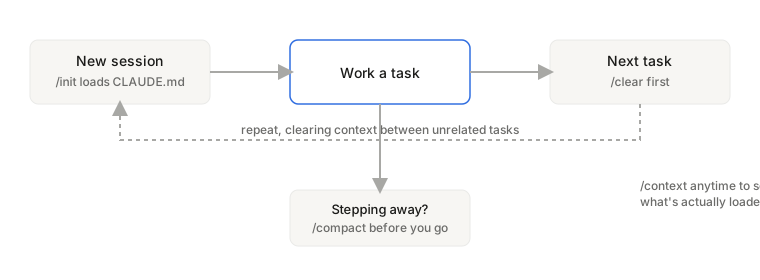 Init once, clear between tasks, compact before you step away.
A few habits that make a real difference:
- Run
/clearbetween tasks that don't relate to each other. Nothing from the old task should still be riding along. - Run
/contextin a fresh session to see what actually loaded: your CLAUDE.md, any MCP tool definitions, active skills, and cut anything you don't need. - Run
/compactbefore you step away from the keyboard. Summarizing a conversation is cheaper while it's still within the prompt cache window than after that cache expires. - Set your model and effort level before you start, not partway through. Changing either mid-session busts the cache Anthropic keeps for your conversation, and a cache miss costs more than a cache hit every time.
- @-mention a file directly instead of typing its name in a sentence. Claude attaches the file to your message, which skips either a Read call or a search if it has to go find it itself.
Build repeatable workflows with skills and hooks
A skill is a markdown file with instructions that Claude either loads automatically when relevant, or that you invoke directly by typing /skill-name. The difference between a skill and a plain CLAUDE.md entry is loading cost: CLAUDE.md content loads in every single session whether you use it or not, a skill's body only loads when the skill actually fires.
Hooks are the other half of automation. They tie a shell command to an event, a tool call, a permission request, a session starting, and run without you doing anything. Managed through /hooks, they're the mechanism behind things like auto-formatting a file right after Claude edits it.
Delegate work with subagents
/agents manages subagent configurations, and Claude Code ships with a few built in for common jobs like exploring a codebase or debugging. Custom subagents live in .claude/agents/ as a markdown file with YAML frontmatter describing what the subagent is for and which tools it gets. Once defined, Claude can delegate to them on its own, or you can invoke one explicitly.
The reason this matters in practice: a subagent that goes and runs a noisy command, a big grep, a verbose test run, keeps that output out of your main conversation's context. Only the summary comes back. That's a context management technique disguised as a delegation feature.
Connect real tools with MCP
/mcp manages Model Context Protocol server connections, which is how Claude Code talks to things outside your filesystem: a database, an issue tracker, a search API. Anthropic and a growing list of third parties publish ready-made servers, so most of the time setup means adding a server rather than building one. Building your own MCP server is a real project in its own right and worth a separate post.
Tighten your own prompts and skills
Everything above manages context Claude Code loads for you. The other half is the context you write yourself: skill descriptions, CLAUDE.md entries, subagent instructions. I built skillit because I kept shipping skills that worked fine but were bloated, a giant description loading every session for a feature I used once a week.
Skillit scaffolds a three tier skill: frontmatter that loads every session, a body that loads whenever the skill runs, and reference material that only loads when the skill actually needs it. Its own rule of thumb: the description loads in every session, so tight wins. /skillit:skill-audit scores every skill in a project against that and shows the combined token cost, /skillit:skill-optimize applies the fix and hands you a diff. It's the same discipline as bead engineering: small, single purpose pieces, loaded only when you actually need them, instead of one bloated block that runs every time regardless.
I ran this against 19 production skills and wrote up every finding, before and after: 13,300 tokens saved a day, none of it from anything exotic. If you want the short, prescriptive version instead of the case study, that's a separate post too.
If you want more breakdowns like this, subscribe to the site or follow along on YouTube at @seeqcode.
Subscribe
New posts on AI, developer relations, photography, and the odd long walk, straight to your inbox. No spam.